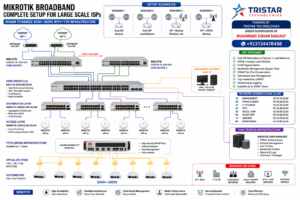

When it comes to networking hardware and software, MikroTik’s RouterOS stands out as one of the most powerful, flexible, and cost-effective solutions available. Whether you’re a network administrator, an ISP, or a tech enthusiast, MikroTik offers enterprise-grade features without the hefty price tag of competitors like Cisco, Juniper, or Huawei.
In this blog post, we’ll explore the key advantages of MikroTik RouterOS and why it might be the best choice for your networking needs.
1. Unbeatable Cost-Effectiveness
One of the biggest selling points of MikroTik is its affordability. Unlike Cisco or Juniper, which charge premium prices and require expensive licensing for advanced features, MikroTik provides full routing, switching, and security capabilities at a fraction of the cost.
- No tiered licensing – Most features are available out of the box.
- Runs on low-cost hardware – From home routers to enterprise-grade appliances.
- Ideal for startups and ISPs – High performance without breaking the bank.
2. Extremely Flexible & Customizable
MikroTik RouterOS is designed for power users who need control.
✔ RouterOS Scripting – Automate tasks with a powerful scripting language.
✔ API & Automation – Integrate with third-party tools via REST API.
✔ Supports all major protocols – BGP, OSPF, MPLS, VPNs (WireGuard, OpenVPN, IPsec), VLANs, and more.
Unlike Ubiquiti’s EdgeOS (which is based on Vyatta) or Cisco’s IOS (which requires complex CLI knowledge), MikroTik offers a balance of simplicity and depth.
3. All-in-One Networking Solution
RouterOS isn’t just a router OS—it’s a complete networking ecosystem.
Key Features:
✅ Advanced Routing – Full BGP, OSPF, VRF, and policy-based routing.
✅ Enterprise Firewall – Stateful filtering, Layer 7 deep packet inspection.
✅ VPN Support – WireGuard, OpenVPN, IPsec, SSTP, L2TP, and more.
✅ QoS & Traffic Shaping – Prioritize critical traffic easily.
✅ Wireless Management – CAPsMAN for centralized Wi-Fi control.
This makes MikroTik perfect for:
- ISPs (BGP, MPLS, PPPoE)
- Businesses (VPN, firewall, VLANs)
- Home Labs & Enthusiasts (Low-cost, high functionality)
4. Easy-to-Use Yet Powerful Management
MikroTik provides multiple ways to configure devices, making it accessible for beginners and pros alike:
- WinBox – A lightweight GUI for quick setups.
- WebFig – Web-based configuration.
- CLI (Terminal) – Similar to Cisco but more intuitive.
- Mobile App – Manage routers on the go.
Unlike Cisco’s complex IOS CLI or Juniper’s Junos, MikroTik’s CLI is easier to learn while still being powerful.
5. Strong Community & Documentation
MikroTik has a massive global community, with:
- Official Wiki – Extremely detailed documentation.
- Forums & Tutorials – Thousands of guides available.
- YouTube & Blogs – Tons of free learning resources.
Compared to Huawei or Juniper, where enterprise support dominates, MikroTik’s community-driven knowledge base makes troubleshooting and learning much easier.
6. Stability & Performance
RouterOS is lightweight yet powerful, running efficiently even on low-end hardware. Many ISPs and businesses rely on MikroTik for:
- Long uptimes – Stable even under heavy load.
- Optimized traffic handling – Great for QoS and bandwidth management.
- Scalability – Works in small home networks or large ISP deployments.
MikroTik vs. Competitors – Quick Comparison
| Feature | MikroTik RouterOS | Cisco IOS | Juniper Junos | Ubiquiti EdgeOS | Huawei VRP |
|---|---|---|---|---|---|
| Cost | ✅ Very Affordable | ❌ Expensive | ❌ Expensive | ✅ Affordable | 🟡 Moderate |
| Licensing | ✅ No tiers | ❌ Complex tiers | ❌ Complex tiers | ✅ No tiers | 🟡 Some tiers |
| CLI Ease | ✅ Easy to learn | ❌ Steep learning | ❌ Complex | 🟡 Moderate | ❌ Huawei-specific |
| All Features in One Device like Routing, Switching, Firewall, Hotspot, MPLS, Wireless, Container, Media, Cloud, Broadband, VPNs, QoS, DHCP, RADIUS, Kids Control, Many more tools | ✅Yes | ❌No | ❌No | ❌No | ❌No |
| Can be installed on 3rd Party like PC/ Servers/ VMs | ✅Yes | ❌No | ❌No | ❌No | ❌No |
| VPN Options | ✅ WireGuard, IPsec, OpenVPN | ❌ Mostly IPsec | ❌ Mostly IPsec | ✅ IPsec, OpenVPN | 🟡 IPsec, SSL |
| Automation | ✅ ROS Scripting, API | 🟡 Limited (EEM) | 🟡 Limited | ❌ Basic | 🟡 Limited |
| Community | ✅ Huge & Active | 🟡 Enterprise-focused | 🟡 Enterprise-focused | ✅ Strong | ❌ Limited |
| Can Be Experts in few days | ✅Yes | ❌No | ❌No | ✅Yes | ❌No |
| Start Earning | ✅immediately | ✅Need Experiance | ✅Need Experiance | ✅in some cases | ✅Need Experiance |
Final Verdict: Who Should Use MikroTik?
✔ Small to Medium Businesses – Need enterprise features without Cisco prices? MikroTik delivers.
✔ ISPs & WISPs – BGP, MPLS, and QoS at a low cost.
✔ Network Enthusiasts – Learn advanced networking affordably.
✔ Homelabs & DIY Projects – Flexible, customizable, and powerful.
While Cisco and Juniper dominate large enterprises, MikroTik is the best value-for-money networking OS for most real-world use cases.


What’s Your Experience with MikroTik?
Have you used MikroTik before? How does it compare to other vendors in your experience?
Start Training now at Tristar Technologies
🔗 Want to learn more? Check out our Students feedbacks after certifications