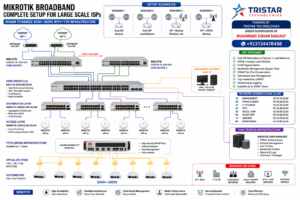
MikroTik is a Latvian technology company founded in 1996 that specializes in networking hardware and software. It is best known for developing RouterOS, a powerful and feature-rich network operating system, and producing a wide range of network devices that serve customers from home users to large-scale ISPs and enterprise networks.
Why MikroTik RouterOS?
MikroTik RouterOS is a powerful, flexible, and cost-effective network operating system that enables businesses of all sizes to build secure, high-performance, and scalable networks. Here’s why it stands out:
🧩 1–10: Cost & Value
- Affordable pricing model
- Enterprise-grade features for less
- No recurring license fees
- Free updates for life
- High return on investment (ROI)
- Ideal for startups and SMEs
- Open access to powerful features (not paywalled)
- Works well with commodity hardware
- Need for quality training and important certifications
- Excellent total cost of ownership (TCO)
⚙️ 11–25: Software – RouterOS
- Advanced firewall capabilities
- Load balancing
- Bonding and interface aggregation
- Routing protocols (OSPF, BGP, RIP, MPLS)
- HotSpot gateway management
- Layer 7 application filtering
- Built-in VPN support (IPSec, L2TP, PPTP, OpenVPN, WireGuard)
- Queuing and bandwidth control
- NAT and port forwarding flexibility
- Web proxy support
- DHCP server and relay
- DNS caching and services
- User manager for RADIUS
- CLI scripting and automation
- Netwatch & scheduled tasks for automation
🛡️ 26–40: Security
- Stateful firewall
- Port knocking
- DoS attack prevention
- FastTrack for trusted traffic
- Connection tracking
- Brute-force login protection
- SSL certificate support
- Secure access (HTTPS, SSH, Winbox encryption)
- Isolated VLANs for guest access
- Interface-based firewall filtering
- Traffic logging and flow export
- Firewall address lists for dynamic filtering
- IPsec site-to-site and remote access
- Packet sniffer & Torch
- API security controls
🌐 41–55: Wireless Features
- AP and client modes
- Wireless repeater and mesh setups
- NV2 wireless protocol
- Frequency scan and analyzer tools
- Built-in spectrum analyzer
- Channel bonding
- Wireless ACL and MAC filtering
- CAPsMAN (centralized AP control)
- Wireless bridging support
- Signal strength and registration tables
- Wi-Fi 6 (on latest models)
- Point-to-point and point-to-multipoint
- Access point isolation
- Indoor and outdoor wireless models
- Long-range and high-throughput options
💡 56–70: Configuration & Management
- Winbox GUI management
- WebFig (browser-based configuration)
- Command-line interface (CLI)
- SNMP support
- API for automation
- Syslog integration
- Configuration backup and restore
- Remote access via Cloud Hosted Router (CHR)
- Zero-touch provisioning (via scripts)
- Mobile app for monitoring
- Fast boot times
- Interface-specific settings
- Easy firmware upgrades
- Custom scripts and scheduled tasks
- Visual routing and traffic tools
📡 71–80: Hardware Variety
- Routers for home to ISP-scale use
- Switches with PoE and Layer 3 capabilities
- Indoor and outdoor devices
- Wireless routers with dual-band support
- High-performance CCR routers
- Fanless and silent models
- Rackmount and desktop formats
- Industrial-grade routers
- Compact form factors
- Devices with built-in LTE support
🔄 81–90: Integration & Interoperability
- Supports standard protocols (IPv4, IPv6, SNMP, VLAN, etc.)
- Compatible with third-party VPN clients
- Integrates well with cloud systems
- Works with most ISPs and modems
- Can be used as a firewall, switch, router, or access point
- VLAN and trunking compatibility
- Easy integration with monitoring tools (e.g., Zabbix, PRTG)
- Flexible topology support (mesh, star, ring)
- CAPsMAN for centralized AP control
- Interoperability with other vendor gear (Cisco, Ubiquiti, etc.)
📚 91–100: Ecosystem, Support & Community
- Extensive official documentation
- Active global user community
- Massive library of online tutorials
- Regular firmware and feature updates
- MikroTik Certified Training Programs
- CHR for cloud-hosted routing (VMs, VPS, etc.)
- MikroTik Academy for schools/universities
- Forums with direct input from MikroTik staff
- Worldwide distributor and support network
- Proven reliability in thousands of deployments globally